Fortinet FortiGate ZTNA — Concept & Deployment Overview
ทำความเข้าใจ ZTNA บน FortiGate ตั้งแต่แนวคิด zero-trust, องค์ประกอบหลัก, flow การทำงาน ไปจนถึงแนวทาง deploy แบบ phased สำหรับ SMB
1. ทำไม SSL-VPN ถึงไม่พออีกต่อไป#
หลายปีที่ผ่านมา SMB ไทยส่วนใหญ่ใช้ SSL-VPN บน FortiGate firewall เป็นช่องทางหลักให้พนักงานเข้าถึงระบบภายในจากที่บ้าน ซึ่งใช้งานได้ดีในระดับหนึ่ง แต่ปัญหาที่ค่อย ๆ ปรากฏชัดคือ เมื่อ user login ผ่าน VPN แล้วถือว่าอยู่ใน trusted zone ทันที ไม่ว่าเครื่องนั้นจะลง patch ครบหรือไม่ มี antivirus หรือเปล่า หรือเป็น personal laptop ที่ลูกหลานใช้เล่นเกมตอนกลางคืน ระบบก็ปฏิบัติเหมือนกันทั้งหมด
ที่หนักกว่านั้นคือช่วงปี 2023–2024 มีช่องโหว่ระดับ critical บน SSL-VPN ของหลายค่าย (รวมถึง FortiGate เอง เช่น CVE-2023-27997) ที่เปิดให้ attacker เข้าระบบได้โดยไม่ต้อง authenticate สะท้อนว่าโมเดล เปิดประตูใหญ่แล้วค่อยตรวจคน รับมือภัยคุกคามยุคนี้ไม่ไหวอีกต่อไป
ZTNA หรือ Zero Trust Network Access เปลี่ยนแนวคิดเป็น ไม่เชื่ออะไรโดยอัตโนมัติ ทุก request ต้องผ่านการตรวจสอบทั้งตัวคน (identity), ตัวเครื่อง (device posture) และ context (เช่น แอปไหน เวลาใด) ก่อนจะอนุญาตให้เข้าถึงแอปทีละตัว ไม่ใช่เปิด tunnel แล้วเดินทะลุได้ทั้งวง
2. องค์ประกอบของ ZTNA บน FortiGate#
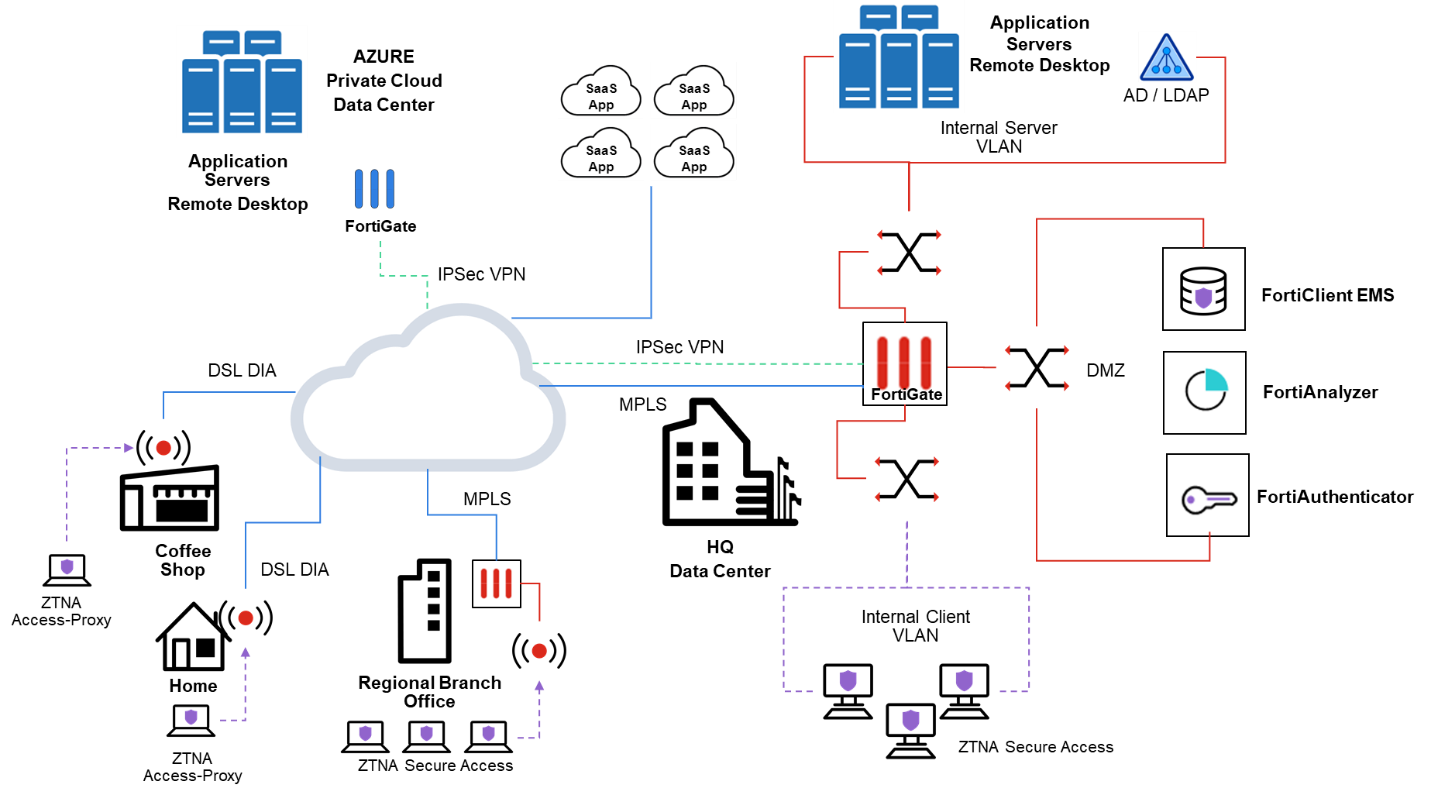
Fortinet ออกแบบ ZTNA ให้ทำงานร่วมกันสามชิ้นหลัก:
1) ZTNA Application Gateway (FortiGate) ทำหน้าที่เป็น HTTPS access proxy คั่นกลางระหว่าง client กับแอปภายใน ทุก session ของ user จะวิ่งผ่าน FortiGate ที่ทำ TLS termination ตรวจ certificate ของ client แล้วค่อย proxy ต่อไปยัง backend (เช่น OWA, RDP gateway, internal web app)
2) FortiClient EMS (Endpoint Management Server) เป็นศูนย์กลางจัดการ endpoint ทำหน้าที่ออก client certificate ให้แต่ละเครื่อง รวบรวม telemetry เช่น OS version, AV status, vulnerability score แล้วแปลงเป็น ZTNA tag ส่งกลับให้ FortiGate ใช้ประกอบการตัดสินใจ
3) Certificates + Posture Tags หัวใจของ trust model
Client certificateออกโดย EMS ใช้ระบุว่า เครื่องนี้คือเครื่องที่ลงทะเบียนแล้วZTNA tagเช่นlow_risk,av_installed,os_patchedเป็น dynamic label ที่ผูกกับสภาพเครื่อง ณ วินาทีนั้น
จุดที่ต่างจาก VPN เดิมอย่างชัดเจน คือ FortiGate กับ EMS เชื่อมกันผ่าน Security Fabric Connector ทำให้ tag sync แบบ near real-time หาก user ปิด AV กลางวัน tag จะหายภายในไม่กี่นาที และ ZTNA policy จะปฏิเสธ session ถัดไปทันทีโดยอัตโนมัติ
3. ตัวอย่าง Flow และ Config Sketch#
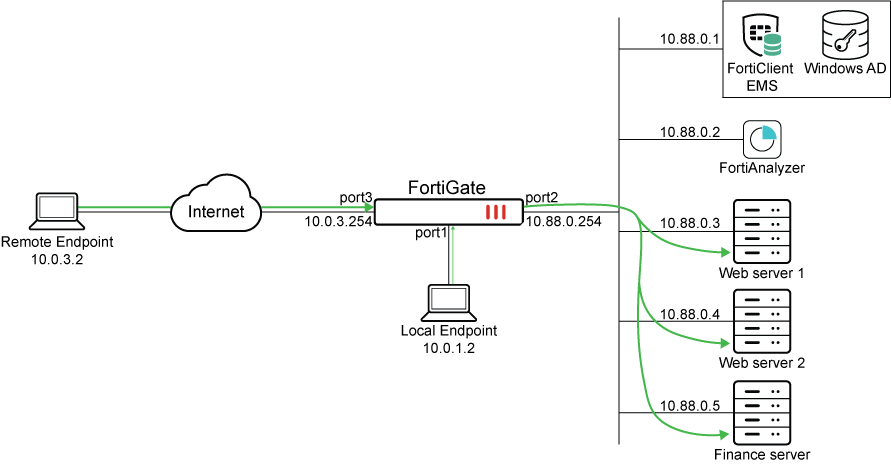
Flow ของ ZTNA session จาก user ที่อยู่ที่บ้าน เข้าถึง internal web app:
[FortiClient] --(1)--> [EMS]              register, get cert + tags
[FortiClient] --(2)--> [FortiGate :443]   TLS + client cert
[FortiGate]   --(3)--> [EMS]              verify cert serial + posture tag
[FortiGate]   --(4)--> ZTNA policy match  (user + tag + app)
[FortiGate]   --(5)--> [Internal App]     proxy traffic
ตัวอย่าง config sketch บน FortiOS (CLI ย่อให้เห็นภาพ ไม่ใช่ production-ready):
config endpoint-control fctems
    edit "ems-hq"
        set server "10.10.10.20"
        set https-port 443
    next
end

config firewall access-proxy
    edit "ztna-webapp"
        set vip "vip-ztna-443"
        config api-gateway
            edit 1
                set url-map "/owa"
                set service https
                config realservers
                    edit 1
                        set address "owa-internal"
                    next
                end
            next
        end
    next
end

config firewall proxy-policy
    edit 10
        set proxy access-proxy
        set access-proxy "ztna-webapp"
        set srcintf "wan1"
        set dstintf "any"
        set srcaddr "all"
        set dstaddr "all"
        set ztna-ems-tag "EMS_HQ_low_risk"
        set users "owa_users"
        set action accept
    next
end
สังเกตว่า policy ไม่ได้ผูกกับ source IP เลย แต่ผูกกับ ผู้ใช้คนนี้ + เครื่องที่มี tag low_risk ซึ่งคือหัวใจของ zero-trust
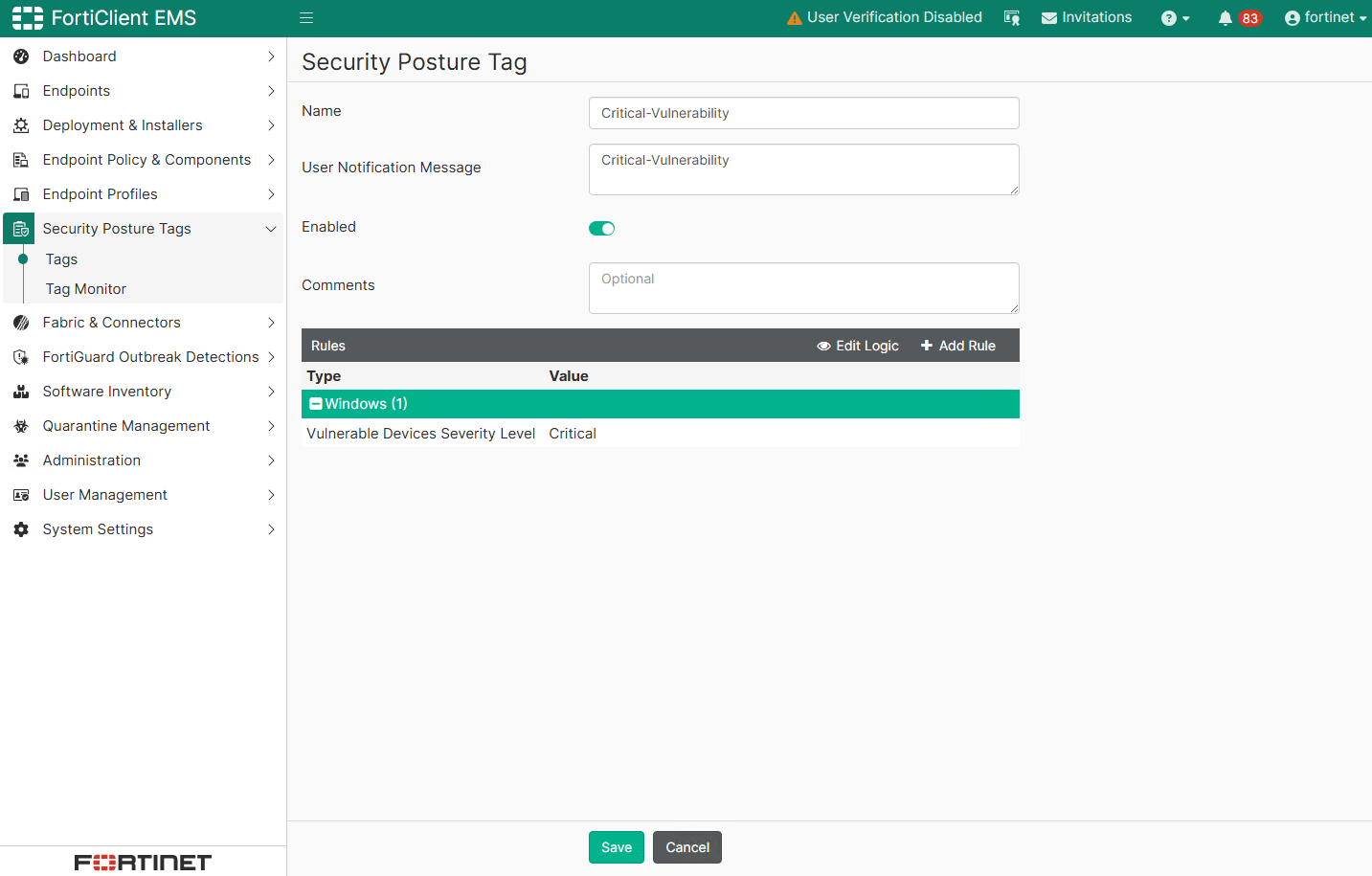
Pitfall ที่เจอบ่อยตอน deploy จริง
- Certificate mismatch — ถ้า CA chain บน FortiGate กับ EMS ไม่ตรง หรือเวลาเครื่อง (NTP) คลาดเคลื่อนเกิน 5 นาที client cert จะถูก reject แบบเงียบ ไม่มี log ที่ชัดเจน ให้ตรวจ
diagnose endpoint fctems test-connectivityก่อนเสมอ - Posture rule เข้มเกินไป — หากตั้ง tag ให้บังคับ AV running + OS patched ครบ + disk encrypted พร้อมกันตั้งแต่วันแรก พนักงานครึ่งบริษัทจะเข้าระบบไม่ได้ เพราะ Windows Update ค้างหรือ BitLocker ยังไม่เปิด ควรเริ่มจาก tag หลวมก่อนแล้วค่อยรัดเข้า
- ลืม fallback — ช่วง pilot ควรเปิด SSL-VPN ขนานไว้สำหรับเครื่องที่ EMS ยัง enroll ไม่ครบ การปิด VPN ทันทีคือสูตรหายนะ
แนวทาง phased rollout สำหรับ SMB
- Phase 0 (สัปดาห์ 1–2) — Deploy
FortiClient EMSและเชื่อม Fabric Connector กับ FortiGate โดยยังไม่แตะ policy เดิม - Phase 1 (สัปดาห์ 3–4) — Enroll เครื่องทีม IT และผู้บริหารก่อน 5–10 เครื่อง ทดสอบ ZTNA กับแอปเดียว (เช่น intranet)
- Phase 2 (เดือน 2) — ขยายให้แผนกที่ใช้แอปไม่กี่ตัว เช่น HR, Accounting พร้อม posture rule แบบหลวม
- Phase 3 (เดือน 3+) — ครอบคลุมทั้งบริษัท เริ่มรัด posture rule และวางแผนทยอยปิด SSL-VPN ภายในไตรมาสถัดไป
4. สรุป + Checklist สำหรับเริ่มโครงการ#
ZTNA บน FortiGate ไม่ใช่แค่ เปลี่ยน VPN เป็นของใหม่ แต่คือการเปลี่ยนวิธีคิดเรื่อง trust ตั้งแต่ราก จาก network-centric ไปเป็น identity + device-centric ซึ่งเหมาะกับยุคที่พนักงานทำงาน hybrid และอุปกรณ์มีหลากหลาย
Pre-deployment checklist:
- FortiGate รัน FortiOS 7.0+ (แนะนำ 7.2 ขึ้นไปสำหรับ stability)
- FortiClient EMS license พร้อม ZTNA module
- วาง CA strategy ให้ชัดเจน เลือกใช้ EMS built-in CA หรือ internal PKI
- NTP server ที่ FortiGate, EMS และ endpoint ต้องตรงกันทั้งหมด
- ทำ inventory แอป internal ที่จะ migrate (HTTPS app ก่อน แล้วค่อย TCP forwarding)
- กำหนด posture tag set เริ่มต้น (แนะนำเริ่มจาก 2 tag คือ
enrolledและav_on) - เตรียม fallback plan และสื่อสารกับ user ให้ชัดก่อน enforce
- วาง monitoring โดยใช้
FortiAnalyzerหรืออย่างน้อย syslog เก็บ ZTNA event ไว้ตรวจสอบ
ถ้าทำตามขั้นตอนนี้ ZTNA จะไม่ใช่โครงการใหญ่ที่น่ากลัว แต่เป็น การยกระดับ security posture ที่ทำได้จริงในไม่กี่เดือน และเตรียมองค์กรให้พร้อมรับมือกับภัยคุกคามที่ SSL-VPN ยุคเดิมรับมือไม่ไหวอีกต่อไป
ภาพประกอบ: Fortinet Documentation — ZTNA Deployment Guide